Choosing an ERP software system sounds like the kind of task that belongs in a windowless conference room with a 40-tab spreadsheet and three competing opinions that never converge.
But in reality, ERP decisions are rarely about software alone.
They’re about whether your finance team can close the books without heroics. Whether operations can trust inventory numbers. Whether leadership can forecast with confidence. And whether your systems support growth—or quietly sabotage it with workarounds, duplicate data, and “temporary” processes that become permanent.
If you’re evaluating ERP in 2026, here’s the good news: the market is packed with strong options. The bad news: most “best ERP” lists are either too generic to be useful or too biased to be trusted.
This guide is built to help you make an informed choice—without drowning you in jargon. You’ll get a clear framework, realistic tradeoffs, and a grounded view of what the leading ERP software options are best suited for.
What “ERP” Actually Means Today
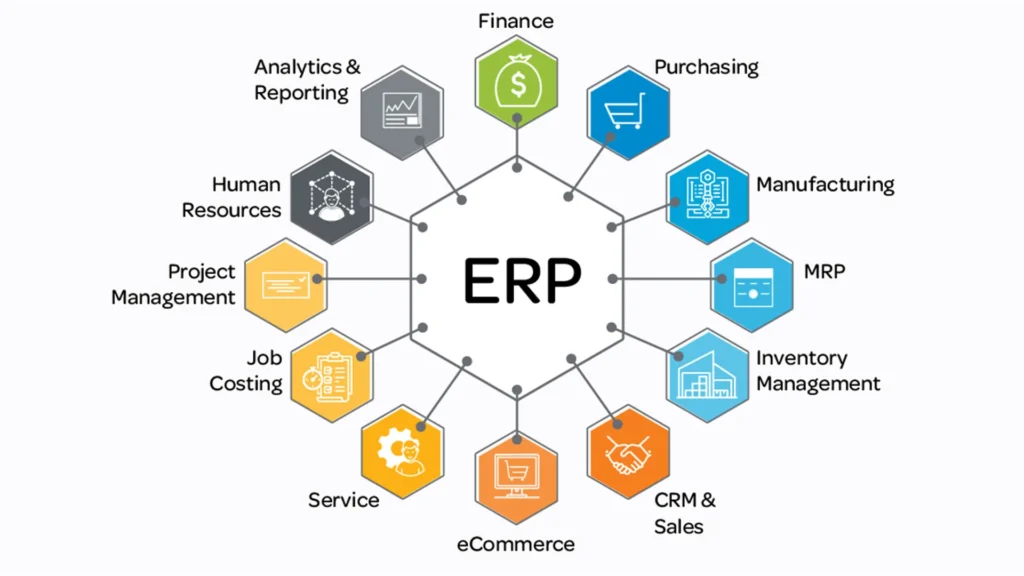
ERP used to mean “one giant system that does everything.” Today, it’s more accurate to think of ERP as a central operating platform for your business—one that integrates financials, inventory, purchasing, operations, projects, billing, and reporting in a way that makes the whole company run with less friction.
The value isn’t the modules themselves. It’s the shared source of truth.
That’s what reduces the classic pain points:
- Finance pulling reports from multiple tools and reconciling inconsistencies
- Sales quoting based on outdated product availability
- Operations tracking procurement in one system and invoices in another
- Leadership making decisions on lagging or partial data
For SaaS companies and subscription businesses, the ERP conversation often starts with one of these triggers:
- You’ve outgrown basic accounting tools
- Revenue recognition is becoming complicated (ASC 606-style complexity, multi-element contracts, usage-based pricing)
- Subscription billing, invoicing, and renewals are messy across systems
- Forecasting is unreliable because data is fragmented
If that’s you, your goal isn’t to “get an ERP.” Your goal is to create operational clarity at scale.
A Quick Reality Check Before You Compare Vendors
Before you look at product demos, ask this:
Replace chaos—or enable the next stage of growth?
If your processes are inconsistent today, an ERP won’t magically fix them. It will force them to be defined. That can be painful… and also the best thing you do this year.
True ERP or “ERP plus best-of-breed”?
Some teams want an all-in-one suite. Others want ERP to handle core financials and ops while integrating specialized tools (CRM, CPQ, subscription billing, warehouse systems, BI).
Both approaches can work—if you plan for integrations from day one.
Buy for now—or for 24 months from now?
ERP implementations are not weekend projects. You want a system that fits now and won’t be a bottleneck later.
The ERP Evaluation Framework That Prevents “Demo Theater”
ERP demos are famous for looking impressive… while avoiding the exact workflows your team struggles with.
Use this framework to keep vendors honest:
1) Core fit: financials, reporting, and control
Even if you’re selecting ERP for operations, the financial foundation matters most because everything flows into it.
Look for:
- Multi-entity / multi-subsidiary support (if relevant)
- Strong reporting and consolidation
- Budgeting/forecasting capabilities
- Audit trails, approvals, and controls
2) Operational fit: inventory, projects, manufacturing, services
Not every ERP is designed to handle your operating model.
Examples:
- Distribution-heavy orgs need robust purchasing, reorder logic, and warehouse visibility
- Manufacturers need BOMs, MRP, production planning, and scheduling
- Professional services need project accounting, resource planning, time tracking, utilization reporting
3) Integration ecosystem
Ask early:
- What do we keep (CRM, billing, data warehouse, HRIS)?
- What must integrate bi-directionally?
- How mature are the connectors or APIs?
Integration is where ERP projects succeed or collapse.
4) Total cost of ownership (TCO)
Subscription pricing is only the beginning.
ERP TCO typically includes:
- Implementation + configuration
- Data migration
- Customizations
- Training and adoption
- Ongoing admin/support
- Add-on modules and integrations
A “cheap” ERP can become expensive if it takes endless customization to fit your workflows.
Leading ERP Software Options and What They’re Best For
Below is a practical view of the major ERP options you’ll see again and again in comparisons—plus what they tend to be best suited for.
NetSuite
Best for: finance-led organizations, multi-entity complexity, strong suite depth
NetSuite is often shortlisted by companies that want a comprehensive cloud ERP with strong financial management and the ability to scale across entities, geographies, and business models.
Tradeoffs to expect:
- Implementation can be complex
- Typically requires partner support
- Costs can climb with modules and users
Good fit if: your business is scaling fast, financial visibility is critical, and you want a robust ERP foundation that can grow with you.
Microsoft Dynamics 365 Business Central
Best for: distribution and mid-market operations, Microsoft ecosystem teams
Business Central is often a strong choice for organizations already living in Microsoft tools (Excel, Teams, Outlook). It tends to be appealing for distribution-style workflows where item management, purchasing logic, and inventory processes are central.
Tradeoffs to expect:
- You may need add-ons for specialized vertical needs
- Complex organizations often require customization
Good fit if: you want flexibility, you value Microsoft-native integration, and your distribution/finance workflows are the core priority.
Acumatica
Best for: flexible, growing businesses that want customization without feeling trapped
Acumatica is frequently positioned as a modern ERP that blends usability with strong capabilities across finance and operations.
Tradeoffs to expect:
- Pricing can vary depending on usage and modules
- “Deep” industry specialization may require additional work
Good fit if: you want a modern UI, strong functionality, and customization options that don’t feel like a penalty.
SAP S/4HANA (and SAP Business One)
Best for: global enterprises and highly complex operational environments
S/4HANA is designed for scale and complexity—global consolidation, high transaction volume, and enterprise-grade process control.
Tradeoffs to expect:
- Implementation complexity and timeline
- Often heavier change management
- Higher overall investment
Good fit if: you’re operating globally, need enterprise-grade control, and can invest in a serious transformation program.
Infor CloudSuite
Best for: industry-specific ERP needs (especially manufacturing and distribution-heavy verticals)
Infor’s strength often comes from industry-specific suites designed around real-world processes in manufacturing, distribution, healthcare, and related sectors.
Tradeoffs to expect:
- Picking the right CloudSuite variant matters
- Implementation outcomes depend heavily on partner execution
Good fit if: you want something tailored to a specific industry operating model rather than a general-purpose platform.
Sage Intacct
Best for: finance-first organizations that want stronger accounting and reporting
Sage Intacct is commonly thought of as a finance powerhouse—often a strong step up for teams that need advanced financial reporting, automation, and audit-ready visibility.
Tradeoffs to expect:
- Not always a full “ops-first” ERP
- May require integrations for broader supply chain needs
Good fit if: finance modernization is the primary goal, and you’re comfortable integrating specialized operational tools.
Odoo
Best for: modular flexibility, open-source adaptability, cost-conscious builds
Odoo often appeals to teams that want modular control: start small, add what you need, and adapt workflows over time.
Tradeoffs to expect:
- Customization often requires development resources
- Quality can vary depending on implementation approach
- Long-term maintainability depends on how you build it
Good fit if: you have strong internal technical capability (or a trusted partner) and want a modular ERP you can shape over time.
Cloud ERP vs On-Prem ERP
Cloud is the default for most modern teams, but on-prem isn’t dead—especially for organizations with strict requirements.
Some tends to win when:
- You want faster deployment and updates
- You need access across locations
- You don’t want to manage infrastructure
- You prefer subscription-based operating costs
On-prem can make sense when:
- You need maximum control over infrastructure and security posture
- You have strict compliance constraints
- You’re operating in environments with limited connectivity
- You already have IT capacity and prefer capital investment
For most SaaS and digital-first teams, cloud ERP is the practical choice—especially when speed and flexibility matter.
Implementation: The Part Nobody Wants to Talk About
ERP success isn’t determined by features. It’s determined by adoption.
A clean way to think about implementation:
Step 1: Define “Day 1” outcomes
What must work on go-live day?
- Core financial workflows
- Billing/invoicing
- Inventory or project accounting (if needed)
- Reporting required by leadership
Step 2: Map processes before you “improve” them
ERP will expose inconsistencies. Document what you do today so you can decide what to standardize.
Step 3: Make training a deliverable
If your system is “done” but users don’t trust it, it’s not done.
Step 4: Build integration discipline early
Treat integrations like products: define owners, testing, error handling, and data standards.
The TCO Trap: Why Pricing Pages Don’t Tell You What You Need to Know
When teams compare ERP systems, they often focus on subscription price.
But real cost includes:
- Implementation services
- Data migration and cleanup
- Workflow configuration
- Integrations
- Training time and productivity dip during transition
- Ongoing admin and support
A practical tip: ask vendors and partners to estimate year one total cost and year two run-rate cost separately. That forces a more honest conversation.
Final Thought: The “Best ERP” Is the One Your Team Will Actually Use
ERP projects fail when leadership buys a system for the organization they wish they had… and forgets the organization they actually have.
The right ERP matches your operational reality, supports future growth, integrates cleanly, and becomes the system people trust—without workarounds.
Once you’ve got a shortlist, run demos around your real workflows, not the vendor’s polished script.
That’s how you pick an ERP that doesn’t just look good in a demo… but actually makes your business run better.
For more articles check out our website.

- Best 5 Shopify Facebook Pixel Apps For Ads Optimization - January 22, 2026
- Leading ERP Software Options for 2026: A Practical Buyer’s Guide for Modern Teams - January 21, 2026
- Best AI SEO Tools for SEO Automation in 2026 - January 14, 2026